
The Account Settings section brings together your personal information and, depending on your situation, the management of your availability. It is accessible to all users, regardless of their role.
Access the page
Click on your profile at the bottom left of the screen (your name and email address will be displayed).
In the menu that opens, select Account Settings.
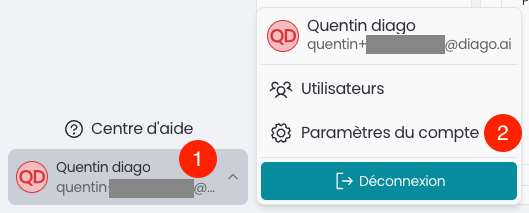
You will then arrive on the My Account page.
My Account tab
This tab contains your personal information, divided into several sections.
Settings
Language – the language used for the interface.
Personal Information
Email – the email address associated with your account. (Not editable)
First Name (required)
Last Name (required)
Settings
Agents – the list of agents you have access to.
Role – your role within the platform (e.g., Administrator, Analyst).
Associated Employees – for each agent, if your account is linked to an employee, their name is displayed here. This link determines whether the My Availability tab appears in the menu (see below).
My Availability Tab
This tab only appears if your account is linked to an employee on at least one agent. It then lists each agent involved (e.g. Argenteuil, Bois Colombes), and allows you to define your personal availability for each of them, in the same way as for a transfer number.
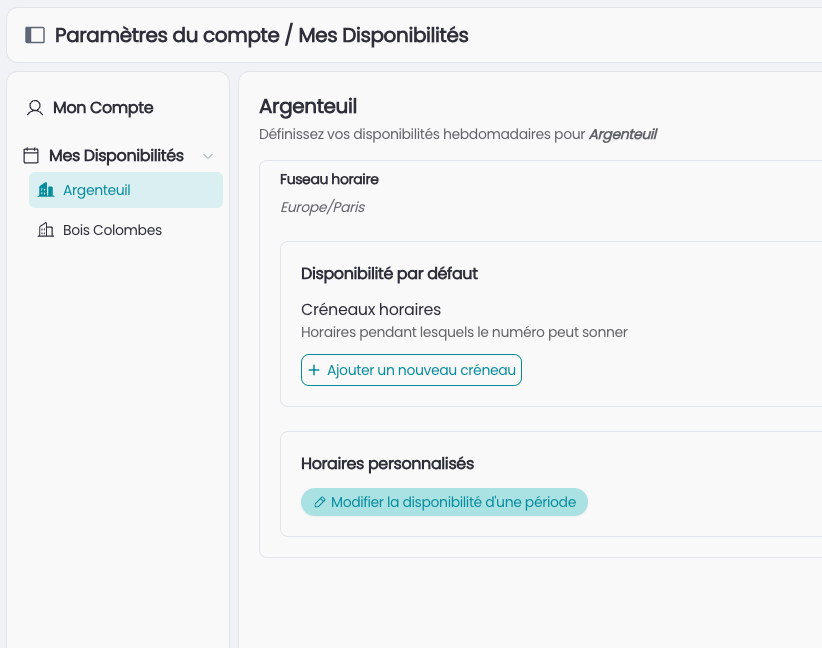
For each agent, you will find:
Time zone – the time zone applied to all configured time slots (e.g. Europe/Paris).
Default availability – Time slots – the usual days and times when you are available, modifiable via + Add a new time slot.
Custom schedules – via Edit availability for a period, you can define specific exceptions (time off, public holidays, etc.) over a given date range.
💡 For more details on how time slots and custom schedules work, see the Availability Tab section of the Transfer Numbers article, the operation is identical.